

LOCALonly in your browser
Develop locally. Preview on your live Webflow site.
Write TypeScript or SCSS in your own editor and see it on your real Webflow URL without publishing. Everyone else keeps getting production.
npm install -g @stagepass/cli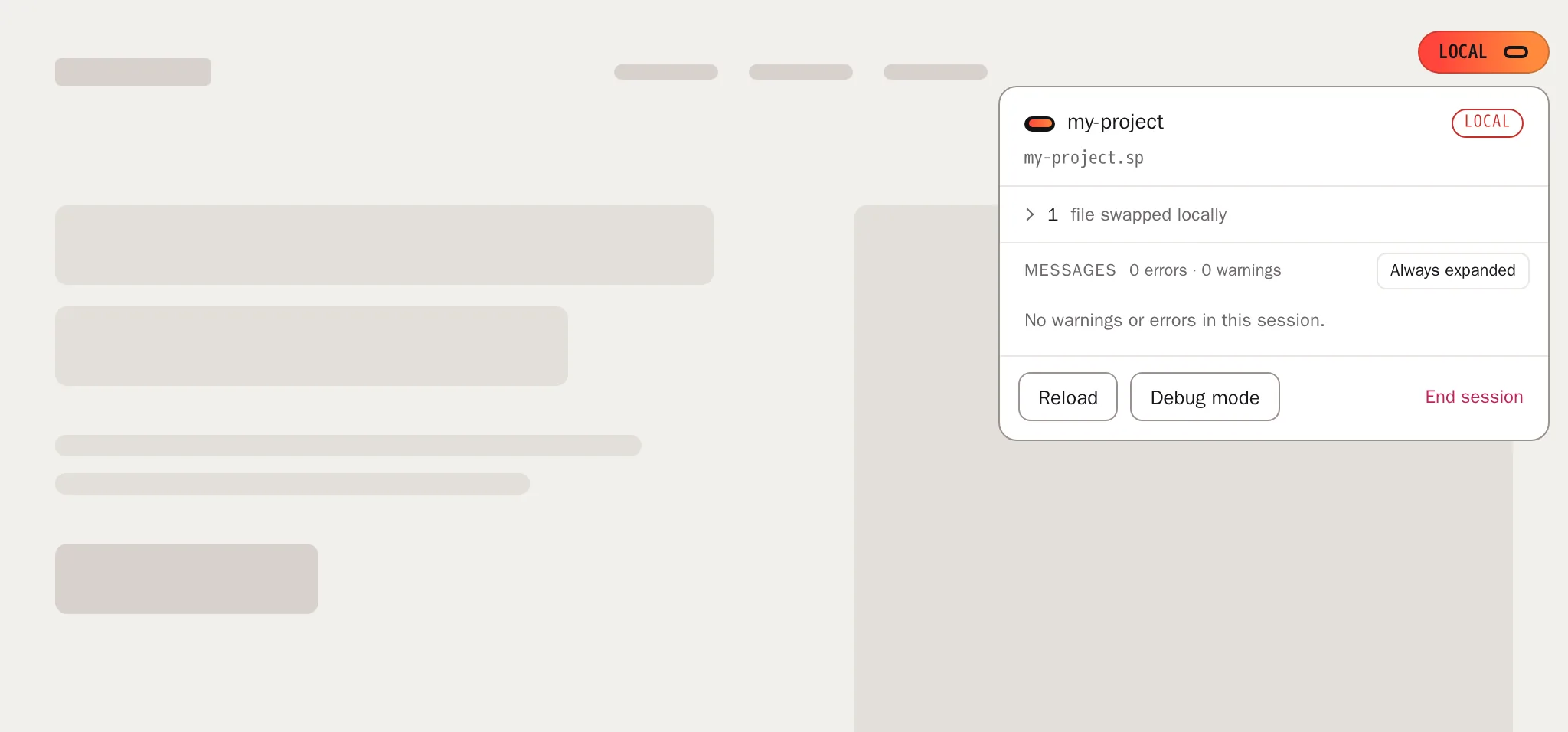
How it works
From your editor to the live site.
A local SSL proxy serves your files on a .sp domain. A small loader on your Webflow site swaps tagged scripts and styles for your local versions, but only while your session is on.
Three steps
Your first session in minutes.
- 01
Link your folder
Run setup once, then link the folder with your built files. It is served at
https://my-project.spwith valid SSL.$ stagepass setup && stagepass start $ stagepass link my-project - 02
Add the loader
Paste one script into Project Settings, Custom Code, Head Code. Then tag the assets you want to swap.
<script data-src="https://cdn.example.com/app.min.js" data-stagepass="true" data-stagepass-path="js/app.js"></script> - 03
Open your live URL
Add the parameter once. The session stays in localStorage while you browse and reload.
https://www.my-client.com/?stagepass=my-project.sp
Always visible
You always know when local code is on.
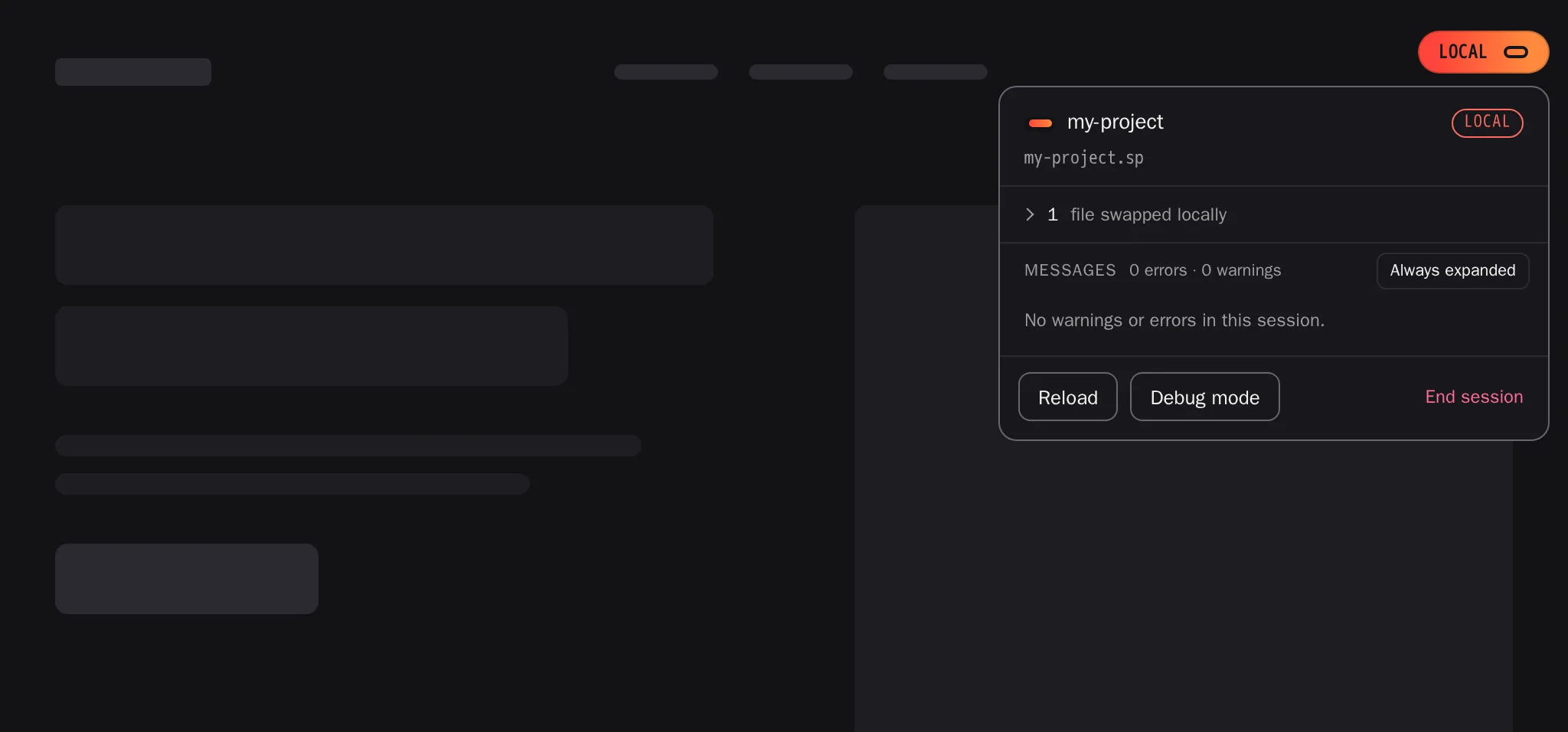
While a session is active, a small flag sits in the top right corner. Hover it for warnings and errors, click it for the session card and End session. No flag means you see the live site, like every visitor.


Local
Tagged files load from my-project.sp. Turn on with ?stagepass=my-project.sp.


Debug
Logging only, no files are swapped. Turn on with ?stagepass=debug.
Off
Production for you and for everyone else. Use ?stagepass=off or End session in the flag card.
Install
Two packages, pinned versions.
The CLI runs on your Mac. The loader runs on your site. The major pin @2 brings fixes without breaking changes.
CLI
Needs macOS, Node.js 18+ and Homebrew. Setup installs Caddy, Dnsmasq and PHP. No Docker.
$ npm install -g @stagepass/cliLoader 2.3.0
One script tag in Head Code, loaded with defer. Safe for production.
<script src="https://cdn.jsdelivr.net/npm/@stagepass/loader@2/dist/loader.min.js"></script>Modules 2.2.0
Load only what you need.
Modules extend the loader. Include them as separate script tags after the loader.
Injector
Inject scripts and styles from code with sp.inject(), one by one or in a batch.
inject.min.js
Cookies
Small helpers to set, read, delete and list cookies: bake, eat, throw, has, list, with optional consent categories.
cookies.min.js
Maintenance
An overlay for visitors while you work. You still see the real page with a session.
maintenance.min.js
All in one
Every module in a single bundle, when you want one tag instead of several.
all.min.js
Security first
Built for live sites with real visitors.
The loader does not allow arbitrary code injection. Read the full security notes in the docs.
- Origin whitelist. Local files only from domains ending in .sp, localhost or localhost:*.
- Production by default. Without an active session, tagged assets keep their production URLs.
-
One source of truth.
data-srcdecides, so scripts never load twice. - Quiet logging. Stagepass logs stay silent in production when no session is active. Your own console is untouched.
How Stagepass is built
Built with AI coding agents and tools, every release reviewed by a human.Open source under MIT. Every line is on GitHub.
View on GitHubStop publishing to test.
Link a folder, add one script, open your live URL.